
● PL Admin Bot · Documentation
PL Admin Bot documentation
Verification, onboarding, leveling, tickets, moderation and security for your Discord — plus a web dashboard. Everything below is on the free tier unless marked Premium. Start with installation, then explore the feature reference, the full command list, and the dashboard guide.
Getting started
1 · Add the bot
On the Admin Bot page, click Install Free Bot and authorize it onto your server. The Admin Bot requests Administrator permission — it needs full access to manage roles, channels, moderation, tickets and security across your whole server. It starts on the free tier — you can upgrade any time.
2 · What happens next
As soon as the bot joins, it automatically:
- Posts a “Start Setup” panel in your server,
- Registers your server in your member dashboard (sign in with Discord to manage it from the web), and
- Syncs its slash commands.
Channels — before you run setup. You don’t need to create anything. The setup wizard creates every channel and panel for you automatically, including a moderator-only category for the admin panels and a verification channel for your members. If you’d rather reuse channels you already have — a verification channel, a log channel, a rules channel — just have them ready, and you can point the wizard at them during setup instead of creating new ones.
⚠️ Important · Role order. Discord only lets a bot give out roles that sit below its own role, and the bot’s Administrator permission doesn’t change that. Drag the Admin Bot’s role (named “Paul Laurent Admin Bot”, or your server’s custom brand name) above every role it has to give out: unverified, verified, auto-roles on verify, level-reward roles, trial roles and optional roles. Otherwise Discord blocks it and those roles are silently not assigned.
- Open Server Settings → Roles.
- Drag the Admin Bot’s role above all the roles listed above.
- Save changes.
Payment bots: if your server uses Whop (or a similar bot) for paid roles, keep that bot’s role above the paid roles too. Example order: Whop Bot → Admin Bot → Premium → member roles → Verified → Unverified.
Bot and integration roles (the roles Discord creates for each bot) can never be given to members, so the bot won’t let you pick them as roles to hand out. The setup wizard checks the order before it finishes, and the bot warns you in its update channel if a role ever ends up above it.
If Discord ever refuses a role, the bot alerts you immediately: a line in your log channel naming the role and the member, and a warning in its update channel. If you have neither channel, the server owner gets one DM.
3 · Run the setup
Click Start Setup on the panel (or run /setup-wizard). The guided wizard walks you through trials, roles, security, channels, welcome DMs and tickets, then builds all the admin control panels for you. Everything can be adjusted later from the individual panels or the dashboard.
If the panel didn’t appear (or you reinstalled), run /setup-wizard at any time to (re)start the guided setup — it’s safe to re-run and only fills in what’s missing. (/setup opens the classic menu-style setup if you prefer it.)
4 · Verified & unverified roles
Verification gates access to your server: a new member gets an unverified role, and once they complete verification they receive the verified role that unlocks your channels.
The wizard creates both roles automatically. If you’d prefer to use a verified role you already have, you can — just make sure:
- the verified role actually grants access to your member channels, and
- the bot’s own role sits above it in Server Settings → Roles, so the bot is allowed to assign it (see Role order).
📣 Your private update channel
When the bot joins, it creates #pl-admin-bot-updates inside its own category (or at the top of your channel list if that category doesn’t exist) and pins a short welcome message there.
- Who sees it: it’s hidden from your members — only you (the server owner) and anyone with the Administrator permission can see it. If you transfer the server, the new owner sees it automatically.
- What gets posted: announcements about new features from the PL team, and setup warnings when something in your setup needs attention (for example no bypass roles while link detection is on, no log channel while the bot is removing messages, or a role the bot has to give out sitting above its own role). Nothing else — no ads, no billing notices.
- No spam: a setup warning only appears if you use the feature it’s about, is posted at most three times (at least a week apart), and has a Don’t warn me again button. You get a short note once the problem is fixed.
- Deleting it is fine. The bot never recreates it on its own. You can re-create it, or pick any existing channel to receive updates, on the web dashboard under Update channel — that’s also where you turn silenced warnings back on.
⚠️ Important · Restrict who can use the bot. Because the Admin Bot has Administrator permission, its commands could be run by anyone who can reach them unless you lock them down. Go to Server Settings → Integrations → PL Admin Bot → Manage and restrict its slash commands to your admin/staff roles or specific channels. The admin panels are already placed in a moderator-only category, but you should make sure no regular member can run admin commands.
🛡️ Auto-bans are OFF by default. Every automatic ban — invite links, external links, @everyone/@here, solicitation spam and impostor detection — starts disabled, so no one is banned by accident. Every server runs differently: if you allow members to post invites or mentions, leave these off. When you do want auto-ban (a Premium feature), turn it on one threat at a time and add your exempt roles first (staff, trusted members) via the Security Bypass, so they’re never caught.
Feature reference
What each feature does, the panel it lives on, and the commands behind it. Free unless marked Premium; capped features show the free limit and what Premium unlocks. Most commands are admin-restricted — see Restrict access.
Onboarding & access
Verification
Gate your server with an Unverified → Verified role swap: a new member starts unverified and only unlocks your channels once they complete the verification panel.
Panel & setup: post the panel with /verify post; set the verified role and verification channel in the dashboard Setup & Access section, or with /config-role set and /config-channel set-verify. Edit the panel/rules/FAQ text with /config-text set.
Role order: the bot’s role must sit above Unverified, Verified and your auto-roles, or new members won’t get them. See Role order.
Auto-granted roles on verify
3 → unlimitedPick roles that are handed out automatically the moment a member verifies — e.g. a base “Member” role plus starter roles. Free servers can auto-grant up to 3; Premium is unlimited. Configured in the dashboard Setup & Access section.
Setup Wizard
A 9-step guided setup that provisions everything: trials, onboarding roles, security & optional roles, channel assignment, welcome DMs, feature config and tickets — then auto-builds all the admin control panels in a moderator-only category. It’s tier-aware (a free install gets free-tier defaults). Safe to re-run; it only fills in what’s missing.
Commands: /setup-wizard (guided) · /setup (classic menu) · /setup-check (permission & config health check) · /diagnostics (compact status).
Onboarding / Welcome DMs
A DM sent to a member right after they verify. Fully editable with Discord formatting; your text never becomes another server’s default. Turn it on or off independently.
Panel: the dashboard Messages section, or the DM Messages Center — /dm post / /dm-messages.
Trials
PremiumA time-limited trial-onboarding flow for new members (e.g. a 72-hour look inside). Free servers can’t offer a trial flow.
Panel & commands: Trial Center via /trial post; manage individuals with /trial assign, /trial extend, /trial remove, /trial status; /trial scan-mismatches reconciles trial records against actual roles. Default length + auto-grant live in Setup & Access.
Trial DMs & auto-verify-skip
PremiumTrial DMs send a reminder before a trial ends (separate from the welcome DM), editable in Messages. Auto-verify-skip lets a member who already holds a role you’ve designated (e.g. one auto-granted by Whop, Patreon, or any other system you use) skip manual verification entirely.
Community
Leveling / XP
Members earn XP for activity and level up. Core leveling — earning XP, the leaderboard and the level-up announcement cards — is always free. Every server's cards come themed out of the box (the Minimal Dark style with the PL Admin Bot logo), and every member gets a corrected bracket-based progress bar that reflects real cumulative progress instead of resetting to near-zero after each level-up. Premium unlocks card customization — see Level Up card themes below.
Panels: /level post (Level Center) · /level member (member rank + leaderboard panel) · /level leaderboard (force-view, admin). Configure in the dashboard Community section: XP on/off, level-up announcements (dedicated channel or in-place, custom {user}/{level} message), a rank-card access role, and XP exclusions (roles or users that earn no XP).
Rank Check
PremiumA member's private, on-demand rank lookup — a Discord embed showing their level, server rank, progress and total XP. Premium-only: Free servers don't include Rank Check; Premium members can check up to 5×/day each.
How members use it: the My Rank button on the level panel, or the /rank command.
Level Up card themes
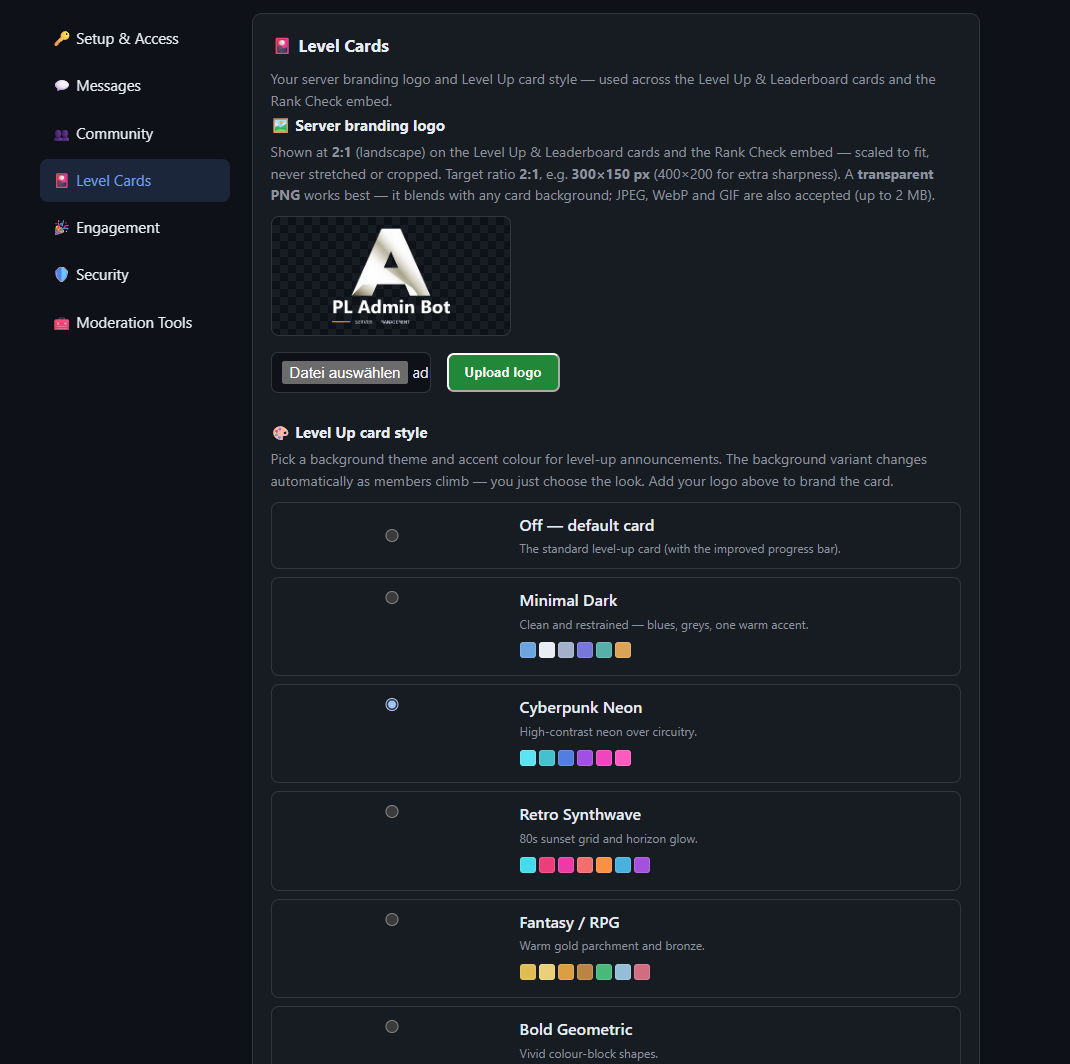
PremiumEvery server starts here: level-up cards render in the Minimal Dark theme with the PL Admin Bot logo by default — Free servers stay on this look. Premium makes the card yours through the dashboard Level Cards section, where you set two things:
- A theme — any of five curated styles: Minimal Dark, Cyberpunk Neon, Retro Synthwave, Fantasy / RPG and Bold Geometric.
- An accent colour — picked from that theme's own palette. The accent tints the progress bar, the “LEVEL UP!” label and the member's avatar ring, so the card stays coordinated with the background.
Premium can also upload its own branding logo in the same section. It replaces the PL Admin Bot logo everywhere your members see it:
- the verification panel and verification steps,
- ticket panels and ticket messages,
- giveaway posts,
- trivia questions, results and stats,
- leaderboards (cards and posts),
- holiday announcement posts,
- level-up and rank cards (including Rank Check).
Panels that are already posted update automatically within about a minute when you upload, change or remove your logo, or when Premium starts or ends — no need to re-post them. On the cards the logo is scaled to fit in the top-right; in panels and posts it’s the small corner image. The “Powered by PL Admin Bot” footer text stays. Free servers, and Premium servers that haven’t uploaded a logo, keep the PL Admin Bot logo. Admin and staff panels always keep the PL Admin Bot logo.
How the background cycle works: each theme ships with five background variants, and the card picks one automatically from the member's level bracket — the widening level bands the progress bar already uses (0–4, 5–9, 10–19, 20–39, 40–89, 90–139, and so on). As a member climbs into the next bracket the background steps to the theme's next variant, and after the fifth it simply wraps back to the first and keeps cycling. Members never choose a variant and it carries no rank or status meaning — it just keeps the look fresh as they progress. You only set the theme and accent; the variant rotation is automatic.
Level-role rewards
3 → unlimitedAutomatically grant a role when a member reaches a chosen level. Free servers can set up to 3 reward levels; Premium is unlimited. Managed in the dashboard Community section.
Role order: keep the bot’s role above every reward role, or the reward isn’t given. See Role order.
Optional Roles
3 → unlimitedA self-service “pick your interests” panel where members give themselves opt-in roles (notification pings, colour roles, interest groups…). Roles are organized into categories, each holding items. Free servers get 3 optional roles; Premium is unlimited.
Commands: categories — /optional-role-category add | list | remove; items — /optional-role-item add | list | remove; preview with /optional-roles; post the member panel with /roles post (admin center /role-admin post).
Trivia
Free · permanent leaderboardMembers play trivia and climb a leaderboard. A weekly recap posts automatically; members check their standing with /trivia stats. Free tier’s leaderboard resets weekly — Premium keeps a permanent, all-time leaderboard.
Commands: /trivia post (settings panel) · /trivia recap (post this week’s recap now) · /trivia stats.
Engagement
Giveaways
Run giveaways with entry requirements (e.g. a minimum server-age in days) and an optional ping role. Set defaults once — duration, minimum age, channel, ping role — and reuse them, or override per giveaway.
Panel: Giveaway Center via /giveaway post. Defaults in the dashboard Engagement section.
Holiday announcements
Auto-post market-holiday cards on the right days. Built in are the U.S. market-close holidays for 2024–2027 — New Year’s Day, Memorial Day, Juneteenth, Independence Day, Labor Day, Thanksgiving and Christmas.
Adding your own / other countries: from the Holiday Center’s Manage Holidays screen you can bulk-add the U.S. market set, import another country’s public holidays by ISO country code (e.g. DE, GB, AT — pulled from the free Nager.Date public-holiday data), or add fully custom date + name entries. Each holiday is tracked by source (market / country / custom), and the same list also drives trial-expiry pausing.
Panel: /holiday post opens the Holiday Center — Enable/Disable, Set Channel, Set Ping Role, Test Card, “suppress if another bot already posted”, and Manage Holidays. The add/remove list is mirrored in the dashboard Engagement section.
Voice tools
Voice-channel utilities, including a confirm step before a mass disconnect so you can’t clear a channel by accident. Post the Voice Center with /voice center-post.
Roles & members
Bulk role operations
Add or remove a role across many members at once, filtered by criteria, with a safe preview → confirm → rollback workflow: every action first shows you exactly who it will affect; /bulk-role confirm runs the prepared job, and /bulk-role rollback best-effort undoes a completed one. The Bulk Role Center panel (/bulk-role center-post) collects it all in one place.
Add filters: add-all (all eligible) · add-joined-after / add-joined-before (by join date, YYYY-MM-DD) · add-where-has / add-where-lacks (members who have / don’t have another role).
Remove filters: the matching remove-all, remove-joined-after, remove-joined-before, remove-where-has, remove-where-lacks — plus remove-other-roles-where-has, which strips every removable role from members who hold a chosen “keep” role, leaving only that one.
Linked & protected roles
Configure up to 10 linked-role slots (/linked-role add | list | remove) and a protected-role list (/protected-role add | list | remove) of roles the bot will never add or remove during bulk/automatic actions.
Invite Tracker
Tracks who invited whom, so you can credit and understand your growth.
Commands: /invite post (Invite Tracker Center) · /invite-stats (one inviter) · /invite-top (leaderboard) · /invite-baseline-set (seed a historical count). External-invite control: allow trusted roles with /invite-bypass-role-add | list | remove, and block known-bad invite codes with /blocked-invite-add | list | remove.
Member history tracking
1000 → unlimitedPer-member join / leave / trial history. Free servers keep the most recent 1,000 members (rotating); Premium keeps everyone.
Commands: look up by mention (/member-history), raw ID (/member-history-id) or name search (/member-history-search); recent activity with /recent-leaves, /recent-rejoins, /recent-trials.
Security & moderation
Security / AutoMod
Detect free · auto-banDetection + alerts run on all tiers for invite links, external links, @everyone/@here mentions, and solicitation / spam content (see below). Automatic bans are a Premium action and start OFF by default — turn them on one threat at a time and add bypass roles first. External-link detection is also OFF by default on new servers (opt in when you want a link-free chat); invite detection is on. Regardless of any of that, known scam links are always removed and the poster banned, free on every server — see below.
Commands: /automod post (AutoMod Center) · /security-check (inspect a member) · /security-scan (sweep for suspicious names / very new accounts) · /security-bypass-add | list | remove (exempt trusted members). Toggles live in the dashboard Security section.
Link & invite protection
Free · auto-ban · scam protection always onThe bot can watch messages for external links and Discord invites and act on them. Everything here is under your control, and most of it is off by default on new servers, so nothing is removed until you decide.
External link detection. When on, every non-Discord link (tweets, news, YouTube, etc.) posted by a member who isn’t exempt is deleted, an alert is posted to your log channel, and the event is recorded. When off, links are left alone. Default: off on new servers — turn it on only when you want a link-free chat.
Invite link detection. When on, Discord invites from non-exempt members are deleted, alerted, and recorded. When off, invites are left alone. Default: on. The Instant Invite Ban setting only does anything while invite detection is on.
Auto-ban Premium. Auto-ban also bans the member who posted, not just deletes the message. It’s a Premium feature, only works while the matching detection switch is on, and is off by default — detection deletes and alerts without ever banning until you turn it on. (One mode: ban on any external link.)
Scam-link protection — free, always on. On every server, free of charge, the bot removes links to known scam domains and bans the poster — even when external link detection is off. This applies to members who aren’t exempt, in protected channels, and is checked against a continuously updated list of known scam domains plus any domains you add to your server’s own custom list. Add or remove your own domains in AutoMod → Links and Mentions → Scam Domains. It can’t be turned off.
Bots and webhooks. Messages from other bots and from webhooks are never checked, so news feeds and integrations keep working normally.
Always allowed. Discord’s own links are never touched — message and channel links, the built-in GIF picker, and Discord’s media / attachments.
Unprotected channels. You can mark channels where link and invite protection doesn’t apply, on the web dashboard. In an unprotected channel, nothing is deleted and nobody is banned — but if a link matches a known scam domain, admins still get a highlighted scam alert. Use this sparingly, and only for channels you’re comfortable leaving unfiltered. The AutoMod panel shows your current unprotected-channel list, read-only.
Ticket channels. Open ticket channels are treated like unprotected channels: ordinary links and invites are left alone, but a known scam link is still flagged to admins with a highlighted alert (it is not removed there).
Who is exempt. Your bypass roles and Premium members are exempt from everything here — including scam-link removal. A scam link from a bypass member is not deleted and they are not banned; admins get a highlighted scam alert noting it was left in place. This is the server owner’s responsibility: give bypass only to people you fully trust, because a hacked bypass account can post scam links freely.
What to expect. Turning external link detection on in an active server will delete everyday links — tweets, articles, YouTube — from regular members. Set up bypass roles first, and don’t make your general member / verified role a bypass role, or detection is effectively off for those members. With both detection switches off, scam links are still removed from non-exempt members in protected channels; nothing else is.
| Setting | Default | Tier | Effect |
|---|---|---|---|
| External link detection | Off (new servers) | Free | On deletes + alerts on member links; off leaves them |
| Invite link detection | On | Free | On deletes + alerts on invites; off leaves them |
| Link / invite auto-ban | Off | Premium | Also bans the poster (needs detection on) |
| Scam-link protection | On, always | Free | Deletes + bans known scam links (non-exempt, protected channels) |
| Bypass roles / Premium | — | — | Exempt from everything, including scam removal (admins still alerted) |
| Unprotected channels | None | Free | No deletion / ban there; scam links still flagged to admins |
| Bots / webhooks | — | — | Never checked |
Manage it: detection and auto-ban toggles live in the dashboard Security section and in the AutoMod Center (/automod post) under Links and Mentions and Invite Protection. Unprotected channels are set on the dashboard. Add your own scam domains under Links and Mentions → Scam Domains.
Solicitation / spam content detection
Detect free · auto-banCatches scam and unauthorized-advertising posts even when they contain no link at all — for example copycat-service ads that list "features" and tell people to grab the link from a profile bio ("link in bio"). It works from the message content itself, so it fires on posts that slip past the invite and link filters. Detection ships enabled with built-in patterns, and you can add your own custom phrases for spam specific to your server. Like the other detectors, flagged posts are deleted and routed to an alert card for review on all tiers; automatic ban is Premium.
Manage it: in the AutoMod Center (/automod post) under Spam / Solicitation — toggle detection, toggle auto-ban, and add or remove custom phrases. Also available in the dashboard Security section.
Impostor protection
Free detect · networkAutomatically detects and removes accounts impersonating a protected identity — your staff, admins, or the server owner — the moment they join, before they can DM or message anyone. Server owners keep a watchlist of protected names; when a new member’s display name matches an entry (exact, partial, or a close fuzzy match) the bot can auto-ban on join and post a public warning so members know not to trust unsolicited DMs claiming to be staff. Free servers get local detection and contribute to a shared cross-server database; Premium adds the network benefit — catching actors already flagged on other servers.
When an impostor is removed, the bot posts an @everyone safety warning in your log channel. Each protected name has its own “Show name in public ban notice” toggle: leave it off (the default) for a generic scam-name pattern, so a repeat offender isn’t told which name kept getting them caught — or turn it on for a real staff/founder identity you want members to recognise. Hidden names are simply left out of the warning (no placeholder) — the ban still happens and is fully logged for admins — while detection still matches every name on the list. New entries default to hidden, so nothing is exposed publicly until you deliberately make it visible. Manage it in the AutoMod Center (/automod post) under Impostor Protection → Name Visibility.
Commands: /impostor-name-add, /impostor-name-remove, /impostor-names (manage the protected-name list).
Scam pattern protection
Free detect · networkA companion to Impostor protection for a different problem: recurring scam accounts that reuse a recognisable display-name pattern rather than impersonating a real person. These accounts rotate — a fresh Discord account and a new username every time — so instead of tracking an identity, the bot tracks the name pattern. Server owners keep a watchlist of scam patterns; when a new member’s name matches one and the account is very new, the bot auto-bans on join before it can DM or message anyone. A match on an older, established account isn’t auto-banned — it’s posted as an alert card for a human to review — so a coincidental name match never removes a genuine member.
Short, minimal aliases (the kind scammers use to slip past a watchlist) are matched exactly, so a two-letter handle is caught without risking false matches on ordinary names. Removals post the same @everyone safety warning as Impostor protection, with the same per-entry “Show name in public notice” toggle — left off by default so a repeat offender isn’t told which alias keeps getting them caught. Bans feed the same cross-server scam-account network as Impostor protection, and Premium servers benefit from patterns flagged elsewhere. Manage it in the AutoMod Center (/automod post) under Scam Pattern Protection — no separate slash commands.
DM Disabler
PremiumA rolling 24-hour DM disabler to blunt raid/scam DM waves across your server. /dm-disabler enable | disable | status; /dm-disabler renew-log toggles the auto-renewal log cards.
Ticketing
1 panel → 3Support ticket panels with private channels and staff controls. Seed the default ticket types, then post a panel members can open tickets from. Free servers get 1 ticket panel; Premium unlocks up to 3 plus per-type keyword tags.
Commands: /ticket-seed-types (create defaults) · /ticket post (admin Ticket Center) · /ticket member (member-facing panel) · /ticket-open-for (open one for a member as staff) · /ticket controls, /ticket-staff-controls (per-ticket controls) · /ticket-status. Config: /ticket-set-category, /ticket-set-staff-role, /ticket-set-type-role, /ticket-set-type-access-role, plus a public suggestions channel (/ticket-set-suggestions-channel, /ticket-set-suggestions-ping-role).
Stats & Exports
200 rows → fullServer statistics and data exports. Free exports return the 200 most-recent rows; Premium exports everything.
Commands: /stats post (Stats & Export Center) · /export-members · /export-former-members · /export-stats (richer workbook) · /export-trial-history — all XLSX/CSV. Troubleshooting: /diagnostics, /permissions-check, /logs recent.
Commands
Every slash command the bot registers (owner-only commands excluded). Type to filter by name, group or description. Most commands are restricted to admins — see Restrict access.
| Command | Group | Description |
|---|---|---|
/config-channel set-invite-log | Setup & config | Set the public invite-tracker channel. |
/config-channel set-log | Setup & config | Set the admin log channel. |
/config-channel set-premium-center | Setup & config | Set the Premium role-center channel. |
/config-channel set-verify | Setup & config | Set the verification channel. |
/config-role label | Setup & config | Change the display label for a core role in setup-check. |
/config-role set | Setup & config | Link one core role in the current server. |
/config-text set | Setup & config | Edit welcome, FAQ, rules, or trial-expiry text. |
/diagnostics | Setup & config | Show a compact server diagnostics summary for this bot. |
/intro-post-config | Setup & config | Configure the welcome line and start-here link for the intro post. |
/permissions-check | Setup & config | Show the permissions this bot currently has in this server. |
/ping | Setup & config | Check if the bot is alive. |
/setup | Setup & config | Open the guided setup wizard for the current server. |
/setup-check | Setup & config | Run a safe setup and permission check for this bot. |
/setup-wizard | Setup & config | [beta] Guided step-by-step setup for this server. |
/verify post | Verification | Post the verification panel in this channel. |
/verify-bypass | Verification | Premium: let members who already hold your Premium role skip verification. |
/trial assign | Trials | Assign or replace a trial for a member. |
/trial extend | Trials | Extend an active trial for a member. |
/trial post | Trials | Post the Trial Center panel |
/trial remove | Trials | Remove Trial early from a member. |
/trial scan-mismatches | Trials | Run a mismatch scan for trial DB state vs role state. |
/trial status | Trials | Show the current trial status for a member. |
/level leaderboard | Leveling & Trivia | Force-view leaderboard (admin only) |
/level member | Leveling & Trivia | Post the member info panel (rank + leaderboard) |
/level post | Leveling & Trivia | Post the Level Center admin panel |
/rank | Leveling & Trivia | View your rank card |
/trivia post | Leveling & Trivia | Post the Trivia settings panel |
/trivia recap | Leveling & Trivia | Manually post this week's trivia recap |
/trivia stats | Leveling & Trivia | View your trivia stats for this week |
/optional-role-category add | Self / optional roles | Add or update an optional-role category. |
/optional-role-category list | Self / optional roles | List optional-role categories. |
/optional-role-category remove | Self / optional roles | Remove an optional-role category and its items. |
/optional-role-item add | Self / optional roles | Add or update an optional-role item inside a category. |
/optional-role-item list | Self / optional roles | List optional-role items. |
/optional-role-item remove | Self / optional roles | Remove one optional-role item by role. |
/optional-roles | Self / optional roles | Admin preview of configured optional role categories and items. |
/role-admin post | Self / optional roles | Post the Role Admin Center panel to a channel. |
/role-center | Self / optional roles | Admin preview of the Premium self-role center. |
/roles post | Self / optional roles | Post the member-facing Premium role center panel. |
/bulk-role add-all | Bulk roles | Preview adding a role to all eligible members. |
/bulk-role add-joined-after | Bulk roles | Preview adding a role to members who joined on or after a date (YYYY-MM-DD). |
/bulk-role add-joined-before | Bulk roles | Preview adding a role to members who joined before a date (YYYY-MM-DD). |
/bulk-role add-where-has | Bulk roles | Preview adding a role to members who have another role. |
/bulk-role add-where-lacks | Bulk roles | Preview adding a role to members who do not have another role. |
/bulk-role center-post | Bulk roles | Post the bulk role center panel in this channel or a selected channel. |
/bulk-role confirm | Bulk roles | Run a prepared bulk role preview job. |
/bulk-role remove-all | Bulk roles | Preview removing a role from all eligible members. |
/bulk-role remove-joined-after | Bulk roles | Preview removing a role from members who joined on or after a date (YYYY-MM-DD). |
/bulk-role remove-joined-before | Bulk roles | Preview removing a role from members who joined before a date (YYYY-MM-DD). |
/bulk-role remove-other-roles-where-has | Bulk roles | Preview removing all removable roles from members who have a keep role, while keeping that role. |
/bulk-role remove-where-has | Bulk roles | Preview removing a role from members who have another role. |
/bulk-role remove-where-lacks | Bulk roles | Preview removing a role from members who do not have another role. |
/bulk-role rollback | Bulk roles | Best-effort rollback of a completed bulk role job. |
/linked-role add | Role safety | Add or replace a configurable linked role slot (1-10). |
/linked-role list | Role safety | List all configured linked role slots. |
/linked-role remove | Role safety | Remove one linked role slot. |
/protected-role add | Role safety | Add a role to the protected-role list. |
/protected-role list | Role safety | List the currently protected roles. |
/protected-role remove | Role safety | Remove a role from the protected-role list. |
/ticket controls | Tickets | Post or repair the Close/Delete control panel in the current ticket channel. |
/ticket member | Tickets | Post the member-facing ticket panel in a channel. |
/ticket post | Tickets | Post the grouped Ticket Center admin panel in a channel. |
/ticket-open-for | Tickets | Open a ticket for a member as staff. |
/ticket-seed-types | Tickets | Create the default ticket types for this server. |
/ticket-set-category | Tickets | Store the category used for ticket channels. |
/ticket-set-staff-role | Tickets | Store the staff role that can access ticket channels. |
/ticket-set-suggestions-channel | Tickets | Store the public channel used for approved suggestions and ideas. |
/ticket-set-suggestions-ping-role | Tickets | Set or clear the optional role ping used on public community ideas posts. |
/ticket-set-type-access-role | Tickets | Set or clear the opener-access role for a ticket type. |
/ticket-set-type-role | Tickets | Set or clear the staff role for a specific ticket type. |
/ticket-staff-controls | Tickets | Open a private staff control panel for the current ticket. |
/ticket-status | Tickets | Show the current ticket-system setup for this server. |
/giveaway post | Engagement | Post the Giveaway Center panel |
/holiday post | Engagement | Post the Holiday Announcements config panel. |
/voice center-post | Engagement | Post the Voice Center panel |
/blocked-invite-add | Invites | Add a known bad Discord invite code or URL to the denylist. |
/blocked-invite-list | Invites | List currently blocked Discord invite codes. |
/blocked-invite-remove | Invites | Remove a Discord invite code or URL from the denylist. |
/invite post | Invites | Post the Invite Tracker Center panel. |
/invite-baseline-set | Invites | Set a historical invite baseline for one inviter. |
/invite-bypass-role-add | Invites | Add a role that bypasses automatic external invite enforcement. |
/invite-bypass-role-list | Invites | List all roles that bypass automatic external invite enforcement. |
/invite-bypass-role-remove | Invites | Remove a role from automatic external invite enforcement bypass. |
/invite-stats | Invites | Show invite statistics for a selected inviter. |
/invite-top | Invites | Show the top inviters in the server. |
/automod post | Security / AutoMod | Post the AutoMod Center panel. |
/dm-disabler disable | Security / AutoMod | Disable the rolling 24-hour DM disabler. |
/dm-disabler enable | Security / AutoMod | Enable the rolling 24-hour DM disabler. |
/dm-disabler renew-log | Security / AutoMod | Turn automatic DM disabler renewal log cards on or off. |
/dm-disabler status | Security / AutoMod | Show DM disabler status and the current expiry. |
/impostor-name-add | Security / AutoMod | Add a protected name for impostor matching. |
/impostor-name-remove | Security / AutoMod | Remove a protected impostor name. |
/impostor-names | Security / AutoMod | List protected impostor names and counts. |
/security-bypass-add | Security / AutoMod | Add a user to the security bypass list. |
/security-bypass-list | Security / AutoMod | List all users currently bypassed from security alerts. |
/security-bypass-remove | Security / AutoMod | Remove a user from the security bypass list. |
/security-check | Security / AutoMod | Check a member for basic scam or imposter signals. |
/security-scan | Security / AutoMod | Scan current server members for suspicious names or very new accounts. |
/dm post | DM messages | Post the DM Messages Center panel. |
/dm-messages | DM messages | Open the DM Messages Center for this server. |
/export-former-members | Stats / history / exports | Export tracked former members as XLSX and CSV files. |
/export-members | Stats / history / exports | Export server members as an XLSX file. |
/export-stats | Stats / history / exports | Export a richer XLSX stats workbook for this server. |
/export-trial-history | Stats / history / exports | Export combined trial history as XLSX and CSV files. |
/logs recent | Stats / history / exports | Show recent internal audit events from this server. |
/member-history | Stats / history / exports | Show join, leave, and trial history for a user. |
/member-history-id | Stats / history / exports | Show stored member history by raw user ID. |
/member-history-search | Stats / history / exports | Search member history by name, nickname, or username text. |
/recent-leaves | Stats / history / exports | Show recent leaves, kicks, and bans. |
/recent-rejoins | Stats / history / exports | Show recent members who rejoined the server. |
/recent-trials | Stats / history / exports | Show recent trial activity events. |
/stats post | Stats / history / exports | Post the Stats & Export Center panel to a channel. |
/cleanup-center post | Cleanup | Post the Cleanup Center panel in a channel. |
/clear-channel | Cleanup | Delete all messages in a channel without deleting the channel. |
Web dashboard
Manage the Admin Bot from dashboard.paul-laurent-trading.com — sign in with the Discord account that owns your server. Everything stays editable in Discord too; the dashboard is an additional way to manage it.
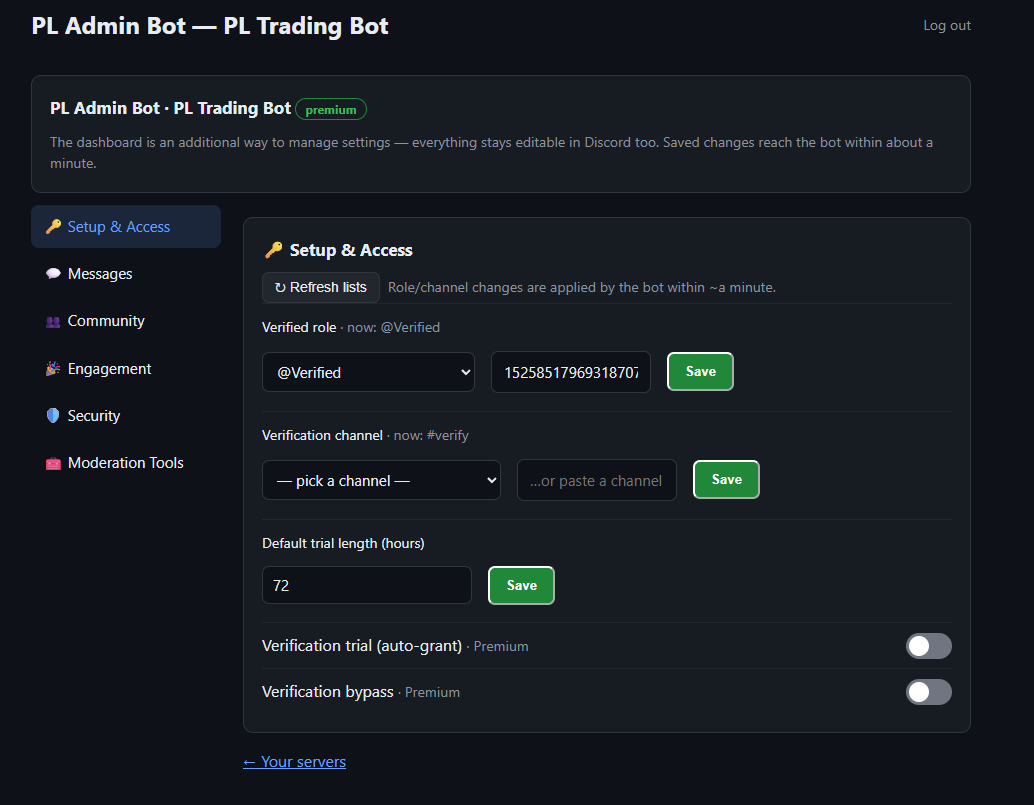
Seven sections:
| Section | What you manage there |
|---|---|
| Setup & Access | Verified role, verification channel, trial length and auto-trial / verify-bypass toggles |
| Messages | Welcome / trial / pre-expiry DM templates and send toggles, plus the verification-panel, rules, FAQ and “Verification Complete” on-screen texts |
| Community | XP toggles, level-up announcements, XP exclusions and level-role rewards |
| Engagement | Giveaway defaults, holiday announcements & the holiday list, and the voice mass-disconnect confirm |
| Security | Your log channel, plus all detection and auto-ban toggles (auto-bans take effect on Premium; detection runs on all tiers) |
| Moderation Tools | Read-only live server stats, a ticket-panel overview, and CSV exports |
| Update channel | Status of your private update channel; re-create it or pick an existing channel; turn silenced setup warnings back on |
Low-stakes changes save directly; higher-stakes changes are applied by the bot within about a minute.